
Almost all websites communicate with browsers using the HTTP or HTTPS protocol to display content, receive data from users, and provide services.
These two protocols are the foundation of data transfer on the internet, but they differ significantly in terms of security and how data is encrypted. In this article, we aim to examine the function and differences between these two protocols in a simple and practical manner.
What is the HTTP Protocol?

HTTP (Hypertext Transfer Protocol) is one of the most important protocols in the Application Layer of the internet, responsible for establishing communication between the browser (Client) and the server (Server).
When a user enters an address in their browser, the browser sends a request (Request) to the server via HTTP, and the server responds with a response (Response) containing the page content (HTML, images, CSS, JavaScript, etc.).
HTTP is essentially the communication language between a browser and a web server, and it forms the basis of all website functionality.
How Does HTTP Work?
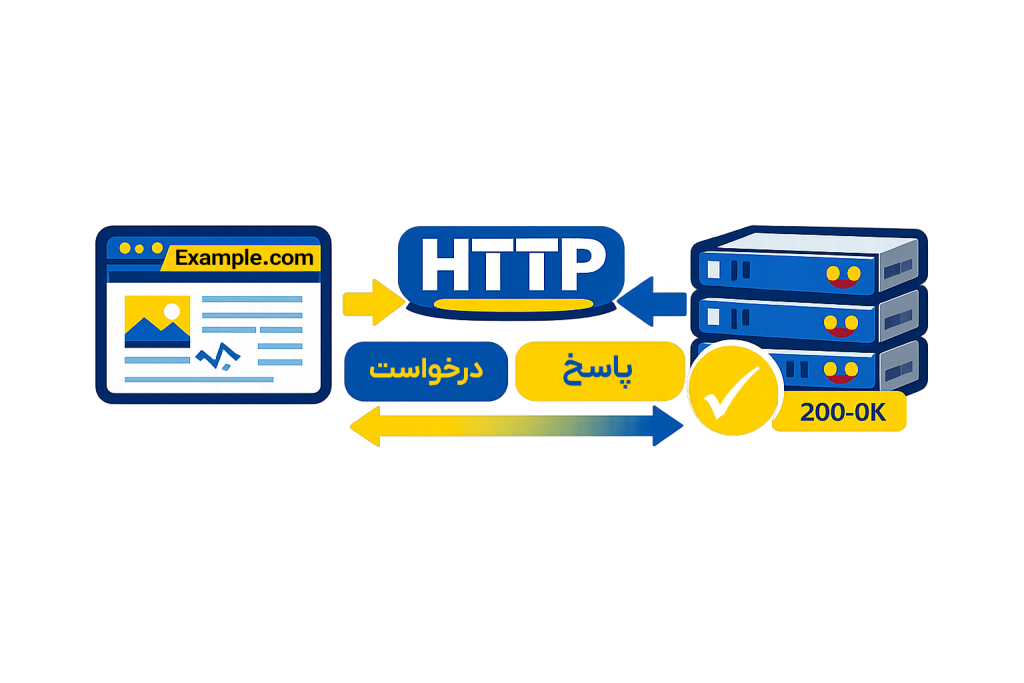
HTTP communication is designed based on the Request – Response model.
Each time a user enters an address in their browser, a request containing information such as browser type, the type of data requested, and the resource address is sent. After receiving the request, the server returns a response with a Status Code and the corresponding content.
For example:
- The browser opens the address
example.com - An HTTP request is sent to the server
- The server returns the HTML content and related files
- The browser displays the received content
Components of an HTTP Request and Response
HTTP requests and responses consist of three main parts:
- Start Line – Includes the method (GET, POST, PUT, DELETE) and the destination address.
- Header – A set of key-value pairs that specify metadata such as data type, content length, or browser type.
- Body – The body of the request or response, which may contain HTML, JSON, or other files.
Status Codes
HTTP returns a three-digit code with each response that indicates the status of the request processing.
Some well-known codes include:
- 200 OK – The request was successful.
- 301 Moved Permanently – The resource address has changed (suitable for permanent redirects).
- 404 Not Found – The requested resource was not found.
- 500 Internal Server Error – An error occurred on the server side.
Understanding and correctly utilizing these codes is crucial for improving SEO and user experience.
HTTP Limitations
While HTTP is simple and fast, it lacks encryption.
This means data such as login information, credit card numbers, or user messages are transferred between the browser and server in plain text and can be intercepted or altered by hackers.
To address this issue, a more secure version was developed: HTTPS.
What is HTTPS?

HTTPS (Hypertext Transfer Protocol Secure) is a more secure version of HTTP that ensures the security of communication between the user and the server through SSL or TLS encryption.
Essentially, HTTPS is HTTP operating within an encrypted tunnel, preventing any third party from reading or modifying the data in transit.
Browsers use port 443 for secure connections and indicate that a HTTPS connection has been established by displaying a padlock icon in the address bar.
The Difference Between HTTP and HTTPS
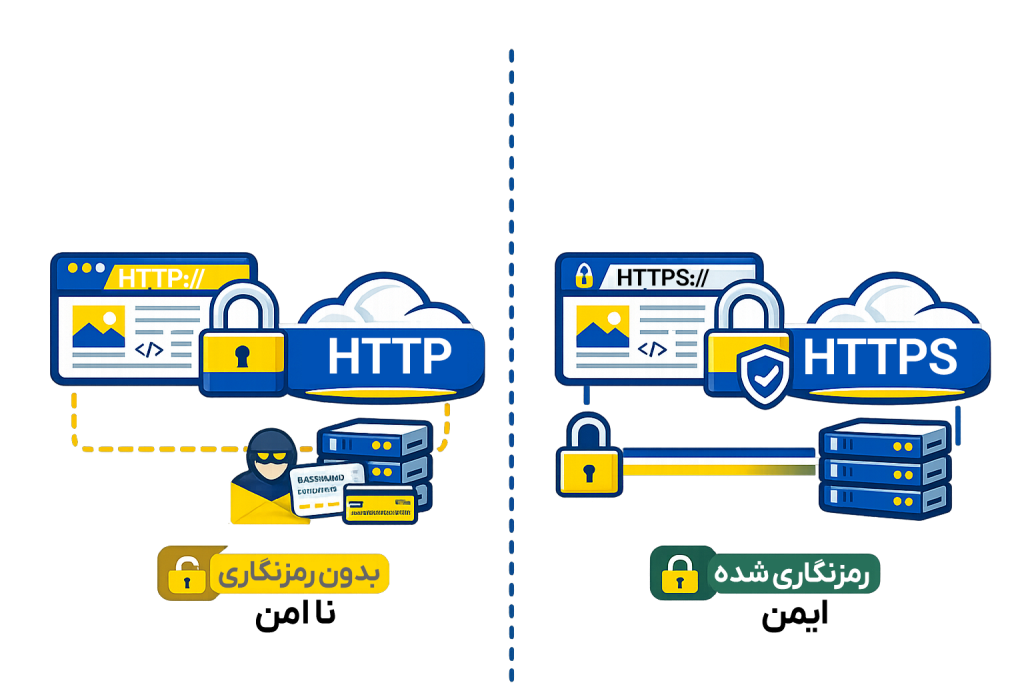
The main difference between HTTP and HTTPS lies in the level of data transmission security. Both protocols are designed to establish communication between a user’s browser and a server, but HTTPS is considered a more advanced and secure version of HTTP. In the HTTP protocol, all information is exchanged between the user and the server as Plain Text; therefore, if someone intercepts the data along the way (e.g., a hacker or network attacker), they can read or even modify it. This can be very dangerous for websites that include sensitive information such as passwords, bank card numbers, or user login forms.
In contrast, HTTPS (Hypertext Transfer Protocol Secure) uses SSL/TLS technology to encrypt the connection. This means that the data exchanged between the browser and the server is placed in an encrypted tunnel and is practically unreadable to anyone outside of that connection. In addition to security, using HTTPS increases user trust and improves your website’s ranking in search engine results, such as Google.
Simply put, if HTTP is like a public conversation, HTTPS is that same conversation taking place in a secure and private room. Today, given security requirements and the importance of user privacy, using HTTPS for all websites – even those that don’t transmit sensitive data – has become an essential standard.
The Importance of Using HTTPS

Using HTTPS is no longer a choice, but a security requirement.
Google and other search engines use HTTPS as one of the ranking factors. Additionally, browsers display websites still using HTTP with a “Not Secure” label.
Benefits of using HTTPS:
- Protection of user data (such as passwords or banking information)
- Increased user trust in the website
- Improve Search Engine Ranking (SEO)
- Mitigate Man-in-the-Middle Attacks
- Prevent Browser Security Warnings
Disadvantages of Not Using HTTPS
Websites still using the HTTP protocol face numerous problems and risks that can harm both user security and the site’s credibility. Some of the most significant drawbacks of not using HTTPS include:
- The possibility of eavesdropping and theft of user information by malicious actors.
- Reduced user trust due to the “Not Secure” message displayed in the browser.
- Lower ranking in search engine results.
- Increased likelihood of content tampering or malicious code injection attacks.
- Decreased conversion rates on forms and payment pages.
For this reason, using HTTP for modern websites, especially e-commerce, corporate, and service-based sites, is strongly discouraged.
What is SSL/TLS and What Role Does it Play in HTTPS?

SSL (Secure Sockets Layer) and TLS (Transport Layer Security) are protocols for encrypting information that form the foundation of security in HTTPS. Currently, TLS is considered the more up-to-date and secure version of SSL, but the term “SSL certificate” is still commonly used.
When a website has a valid SSL certificate:
- The server’s identity is verified to the browser
- Information between the user and the server is encrypted
- The possibility of data being spoofed or altered is minimized
This process establishes a secure, reliable, and stable connection between the user and the website.
Enabling HTTPS on Your Website and Installing an SSL/TLS Certificate
Using an SSL certificate is one of the most essential steps to increase website security and gain user trust. By correctly installing and activating SSL in cPanel and ensuring that all requests are redirected from http to https, you can ensure secure information exchange, protect sensitive user data, and prevent security warnings in browsers.
Installing an SSL certificate in cPanel is possible using tools such as SSL/TLS Status and Let’s Encrypt. These tools, and similar ones, are also available for activating the certificate via the server’s command line interface.
HTTP and HTTPS protocols play a fundamental role in data transmission over the internet, but their difference in security level is significant. While HTTP is simple and fast, it lacks any encryption and is considered insecure for modern websites. In contrast, HTTPS provides a secure, encrypted, and reliable connection using SSL/TLS.

Today, using HTTPS is not only necessary for e-commerce and banking websites, but for all websites. If you are planning to launch or upgrade your website, enabling HTTPS will be one of the first and most important steps to increase security, build user trust, and improve your site’s SEO.
“`html “`