
Docker is a tool or software that allows you to build, test, and deploy applications. Docker maintains software as packages in standardized units called Containers. These Containers include everything needed to run an application, such as libraries, system tools, application code, and execution commands. Using Docker, you can deploy your applications in any environment and ensure they run correctly.
Generally, Docker can be considered a virtualization tool where, instead of creating a virtualized environment and installing an operating system on it, applications are allowed to share the kernel of the operating system. This design makes Containers lightweight, fast, and portable, while each operates in its own isolated environment.
Docker is written in the Go programming language, supports various operating systems such as Windows, macOS, and Linux, prevents conflicts between running codes by isolating them, and unlike other virtualization tools like VMware, Docker operates on the operating system level.
Comparing Operational Conditions Before and After Using Docker
Without using Docker, we face various challenges such as difficulties in deploying applications in virtualized environments, problems with their configuration, issues with providing their dependencies, and more.
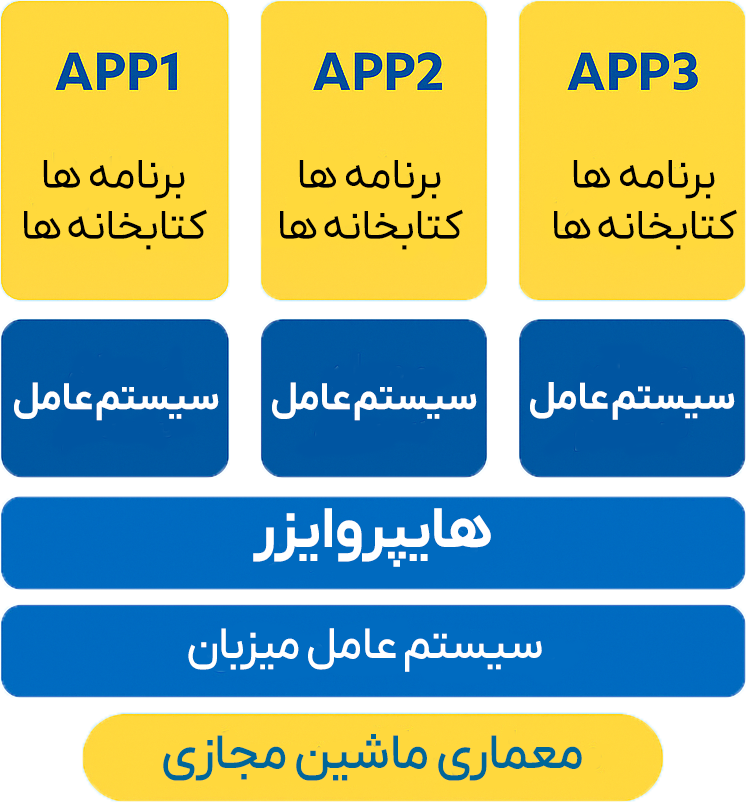
But what is Docker’s solution to this problem?
Docker resolves this issue by optimizing application runtime environments and building all parts of the application and its dependencies within Containers.
Docker adds portability to applications, allowing them to run in different environments without requiring reconfiguration.
It also ensures consistency in applications, so the application behaves the same way during development, review, testing, and final product delivery.
Lightweighting the application is another feature that Docker provides.
Furthermore, Docker increases efficiency and scalability, providing confidence in resource consumption, fast execution, and easy deployment to other services.
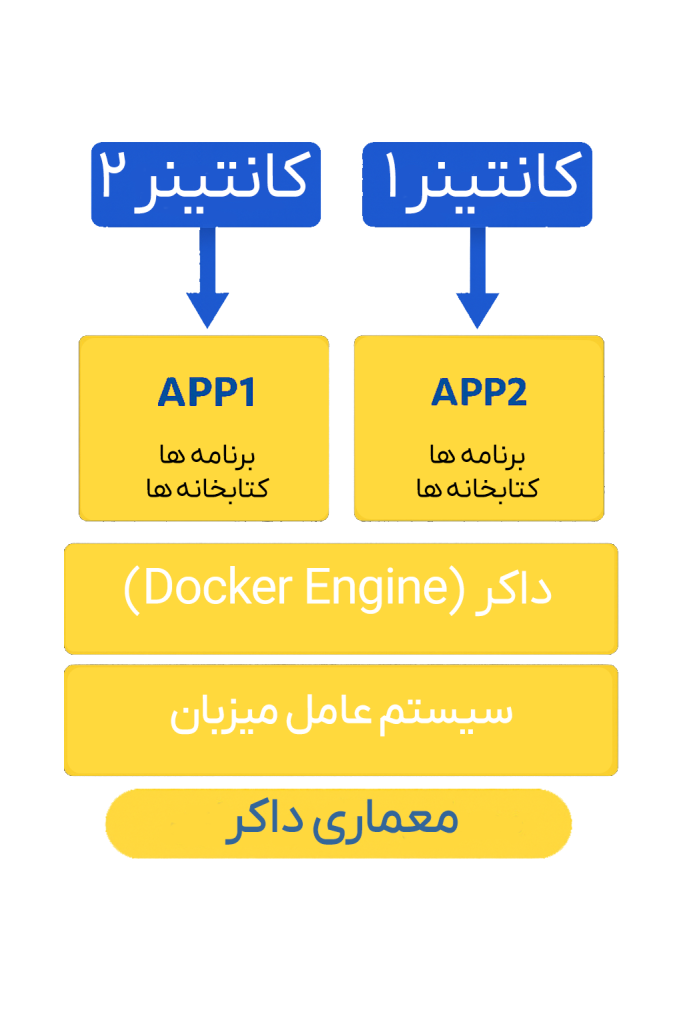
Docker Components
- Docker Engine: The Docker Engine is the core component responsible for building and managing Containers.
- Docker Image: This file is a read-only template used to create Containers, ensure consistent code execution, and provide necessary dependencies.
- Docker Hub: A cloud service that allows you to share and discover various Docker Images.
- Dockerfile: A file that defines the steps to create a Docker Image.
- Docker Registry: A storage system for Docker Images, allowing you to store them privately or publicly.
Docker Engine
Docker Engine is the core component that enables Docker to run Containers. It utilizes a client-server architecture and is responsible for building, running, and managing Containers.
- The Docker Engine Daemon is the component that processes requests from the API and manages Images, Containers, and various networks.
- The CLI portion of Docker, or Docker Client, communicates with the Docker Daemon via the REST API. This component provides a runtime environment where Docker Images are instantiated within Containers.
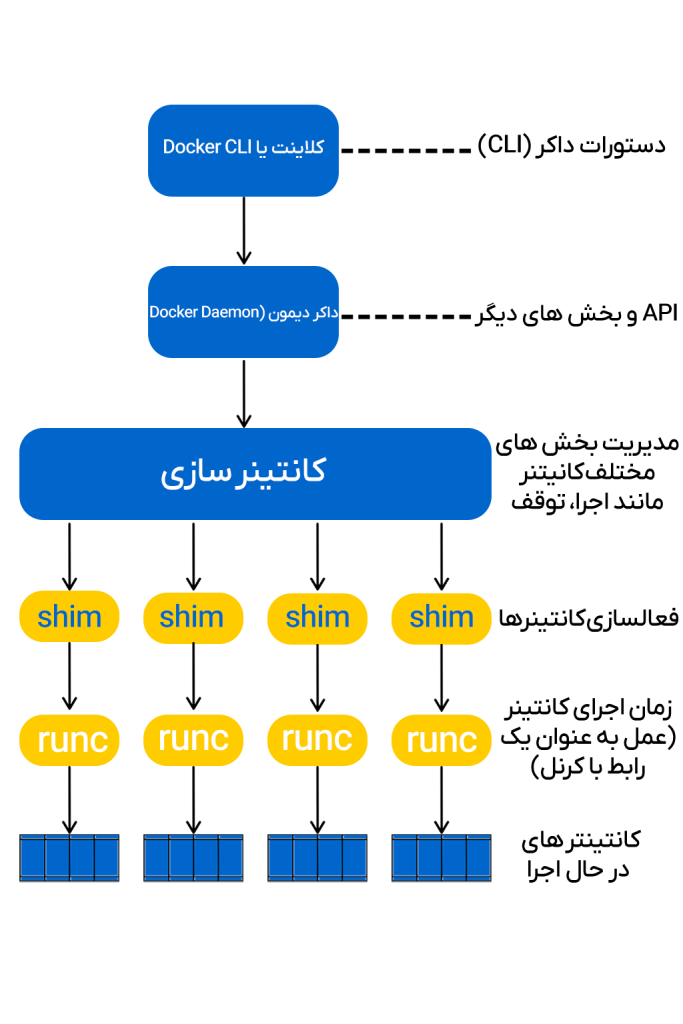
Without the Docker Engine, Images would not be able to be built or run.
Generally, the workflow of the Docker Engine is as follows:
- The Client section sends Docker commands.
- The Daemon section receives these commands and performs operations related to containers.
- And here, the REST API is the interface that enables communication.
The Docker Engine is the process that facilitates containerization and their management by establishing communication between the Docker Client and the Docker Daemon.
Dockerfile
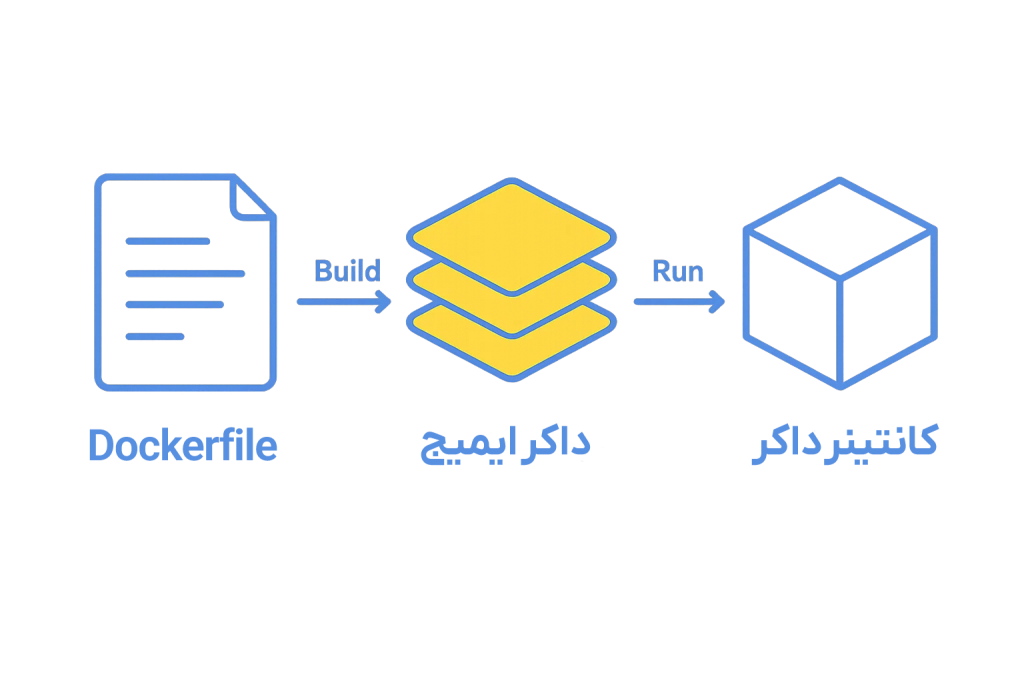
A Dockerfile utilizes a Domain Specific Language (DSL) and contains instructions used to build a Docker Image. The Dockerfile specifies how the Image creation process should be carried out and with what steps. When building an application, it is necessary to write the Dockerfile in the correct order, as the Docker Daemon executes all commands within it from top to bottom.
Essentially, a Dockerfile serves as the source code for an Image.
The Docker Daemon, often simply referred to as “Docker,” is a background service responsible for managing Docker containers on the system.
This file is a text document that contains a set of necessary commands, and by executing them, a Docker Image is created. In fact, a Docker Image is created using a Dockerfile.
Docker Architecture and How it Works
Docker uses a client-server architecture. In this structure, the Docker Client communicates with the Docker Daemon, which is responsible for building, running, and distributing Docker containers.
The Docker Client can run on the same system as the Daemon, or connect to the Docker Daemon remotely.
Communication between the Docker Client and Docker Daemon is done through a REST API, which is accessible either via a UNIX socket or over the network.
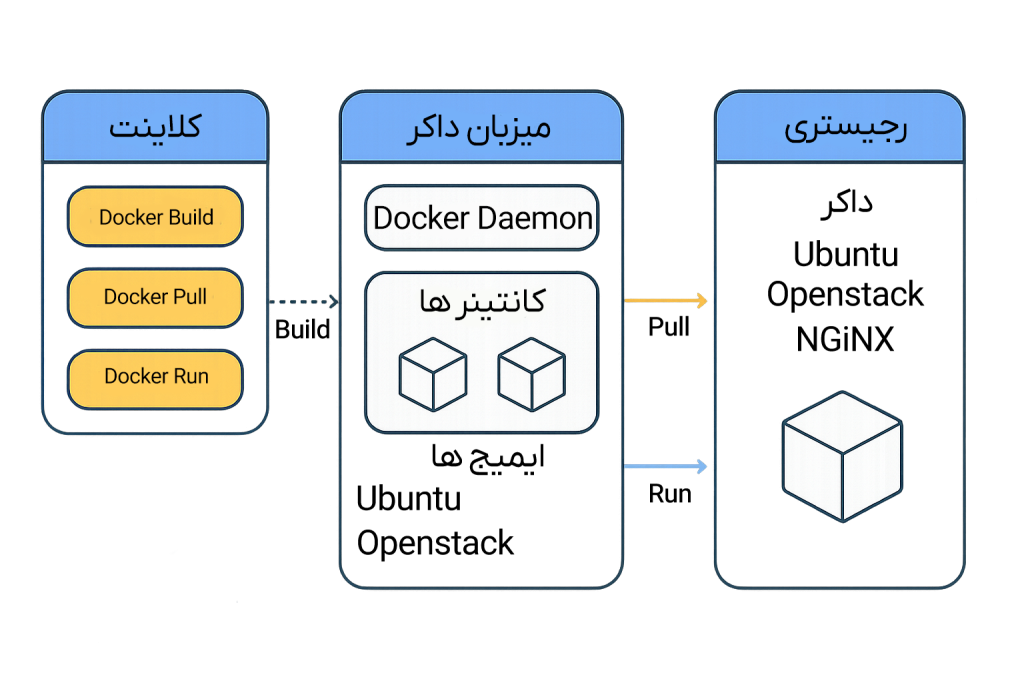
Docker CLI
The Docker Command-line Interface (CLI) is a tool for direct interaction with Docker.
Common and frequently used commands include:docker run, docker build, docker pull
Docker REST API
This section is an HTTP-based API used by the Docker CLI and other tools.
This API facilitates communication between the Docker Client and the Docker Daemon.
Docker Daemon
The Docker Daemon is responsible for managing Images, Containers, Networks, and Volumes.
This service is considered the core of Docker and manages all Docker-related objects.
High-Level Runtime
This section manages the lifecycle of containers.
Its tasks include creating, starting, stopping, and deleting containers.
Docker Image
A Docker Image is essentially a file composed of multiple layers containing the instructions needed to build and run a Docker Container.
This Image acts as an executable package and contains everything required to run an application, such as: application code, Runtime, libraries, environment variables, and configurations.
How it Works:
- An Image defines how a container should be built.
- It specifies which software components are going to run and how they will be configured.
- When an Image is run, the output is a Container.
Relationship to Containers:
Docker Container
A Docker Container is essentially a lightweight, executable, and independent instance of a Docker Image.
The container includes the application code along with all of its dependencies and runs in an isolated environment.
Containers enable applications to run faster, more consistently, and reliably across different environments – whether on a developer’s laptop, test servers, or in production.
How it Works:
- When a Docker Image is run, a container is created from it.
- The container runs as an isolated process on the host machine, but shares the host operating system’s kernel.
Example:
Let’s say you have an Image of the Ubuntu operating system with the NGINX Server installed on it.
When you run this Image using the docker run command:
A container is created, and the NGINX Server will run inside that container on Ubuntu.
What is Docker Hub?
Docker Hub is a cloud-based repository service that allows users to Push (upload) their Docker Images or Pull (download) them from anywhere with an internet connection at any time.
Generally, Docker Hub greatly simplifies the process of finding and reusing Images.
This service provides features such as storing Images as Private or Public, allowing you to manage and share them with others.
The Importance of Docker Hub
- Most DevOps teams use Docker Hub as part of their development and deployment cycle.
- It is an open-source and free tool and can be used on all operating systems.
- It functions similarly to a cloud storage space where Images are stored and can be pulled whenever needed.
Docker Commands
With the introduction of a set of essential Docker commands, this tool has become a powerful software for simplifying container management.
These commands help create a streamlined and integrated development and deployment process.
Common Docker Commands:
Docker Run
Used to run containers from Images.
This command allows you to specify various options related to runtime and container execution settings.
Docker Pull
This command retrieves Images from a Container Registry such as Docker Hub and stores them locally on your system.
Docker ps
Used to display running containers.
It shows important information such as the Container ID, the Image being used, and the container’s status.
Docker Stop
This command stops running containers and gracefully shuts down the processes inside them.
Docker Start
Used to restart containers that have been previously stopped, resuming their operations from where they left off.
Docker Login
Used to log in to a Docker Registry, providing access to private repositories.
Docker Engine
The software responsible for hosting and running containers is called the Docker Engine.
Docker Engine is a program based on a Client-Server architecture.
This engine has three main components:
Server (Daemon)
The server, or daemon, is the component responsible for creating and managing Docker Images, Containers, Networks, and Volumes.
This part runs in the background and forms the core of Docker operations.
REST API
This API specifies how applications can interact with the Docker server.
The REST API provides rules and endpoints that can be used to command the Docker daemon to perform various tasks.
Client (CLI)
The Client is the command-line interface for Docker, allowing communication with the Docker Engine by executing commands.
Users can utilize this tool to issue commands such as building Images, running Containers, and managing resources.